CSCI 51, Fall 2008
Program 2: GUI Calculator
3%
75 points
Assigned: Tuesday, September 16
Due: Tuesday, September 23 at 11:59pm
Description
Write a GUI-based program that mimics a calculator. The program
should
take as input two floating-point numbers and the operation to be
performed.
It should then output the numbers, the operator, and the result
(formatted
to two decimal places).
The user input should be in the format operand1 operator
operand2,
where the operands and the operator are separated by spaces. For
example,
to add 2 and 3, the user should enter 2 + 3 in the
text
field of the dialog box.
You should support the following operations: addition (+),
subtraction
(-), multiplication (*), division (/), exponent (^), and the mod
(%)
operator.
Note: operand1 ^ operand2 means that
operand1
should be raised to the operand2(th) power.
Special cases to handle:
For division, if the denominator is zero, print an appropriate
message.
If the user enters an invalid operator (i.e., anything not +, -,
*, /, ^), print an appropriate message.
You are not responsible for making sure that the user enters numbers,
instead
of letters, for the operands. This would cause a
"NumberFormatException"
when trying to tokenize the input string.
Here's an example run:
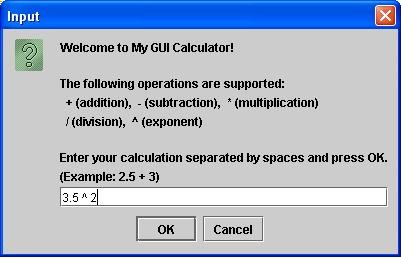
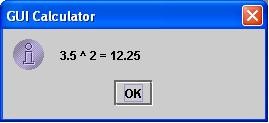
What to Turn in
- Your Calculator.java file
What to Do
- Name your Java source file Calculator.java and your
class Calculator.
Requirements
When I runs/examines your program, it must satisfy the following
requirements.
The maximum point value for each is shown in brackets.
- [5] Your class, Java source file, and Jar file must be
appropriately
named
(as specified above).
- [10] You must use the JOptionPane class to create
dialog boxes
for user input and output. Your user input dialog box should contain
instructions
for using the program, including a list of the supported operations.
- [10] You must display the correct result of the calculation
to
the user.
- [10] If the user attempts to divide by 0, you must print a
message to
that effect (e.g., "division by 0 not allowed").
- [10] If the user enters an invalid operator, you must print
a
message
to that effect (e.g., "operation not supported").
- [10] You must format the result of the calculation to two
decimal places.
- [10] You must use meaningful variable names, which conform to the
style
guidelines and Java naming convention discussed in class.
- [10] You must comment your code, including block-like multi-line
comments
and single-line comments where appropriate. In addition, your code must
be neatly and clearly formatted using appropriate "white space."
Notes:
- If your program doesn't compile or run (i.e., has a syntax
error),
you will receive 0 credit for the items listed above in bold (so, at
most
25/75 points).
- Remember that an implicit requirement for all assignments is that
your
code must include (at the top) the standard
program header with pledge, and your signed pledge must be on file.